Best teleprompter app for MacBook: 6 Mac apps compared
By Zakaria Reziki · · 7 min read
The best teleprompter app for MacBook is the one that puts your script right under the camera, stays on top of Zoom or your recording app, and doesn't make you scroll by hand. Plenty of apps call themselves a Mac teleprompter. Only some are built for a laptop with a camera in a notch. Here's how six real options compare, and who each one suits.
We make Cuey, so weigh our take accordingly. We've kept every claim about other apps to what their makers publish.
What matters in a MacBook teleprompter
1. How close the text sits to the camera
A 2025 study found viewers perceive the strongest eye contact when you look about 2° below the lens (Gao et al., Journal of Vision). At 55 cm from the screen, that's about 1.9 cm. The centre of a 14-inch MacBook Pro screen is roughly 10 cm below the camera, about 10° at the same distance. A prompter window in the middle of the screen reads on camera as looking down. Look for a notch or under-camera placement.
2. Stays above other windows
On calls you're in Zoom, Meet or Teams, not in the teleprompter. The prompt has to float above whatever app is active.
3. Follows your voice
Timed scrolling forces you to match its speed. Voice-based scrolling moves when you speak. Some apps only detect that you are talking. Others match your words to the script, so they hold position when you ad-lib.
4. Native macOS
On Apple silicon Macs, iPad apps can install from the Mac App Store. A listing marked “Designed for iPad” isn't built for macOS (example listing), so check before you buy if you need menu bar access or a floating window.
5. Price model
Free, one-time purchase or subscription. All six below differ.
Mac teleprompter apps compared
| App | On Mac | Near the camera | Follows your voice | Price (Sept 2026) |
|---|---|---|---|---|
| Cuey | Native, macOS 14+ | Notch, under, left or right of camera, floating | Yes, matches words to script | Free version + 2-day trial; Pro $29 one-time (Voice Follow) |
| Textream | Native, macOS 15+ | Notch overlay, floating | Yes, word-by-word tracking | Free, open source |
| Notchie | Native, macOS 14.6+ | Notch | Scrolls when you speak | $29.99 one-time |
| NotchPrompter | Native, macOS 14.6+ | Notch, corners, floating | Scrolls when you speak | $4.99 one-time |
| Teleprompter.com | Native, macOS 12+ | Floating window you position | Yes (VoiceGlide) | Free download, Pro subscription |
| Teleprompter Pro+ | Native, macOS 12+ | Floating window you position | Not listed | Free download, Pro $59.99/yr or $159.99 once |
The apps, one by one
Cuey: best for eye contact on calls
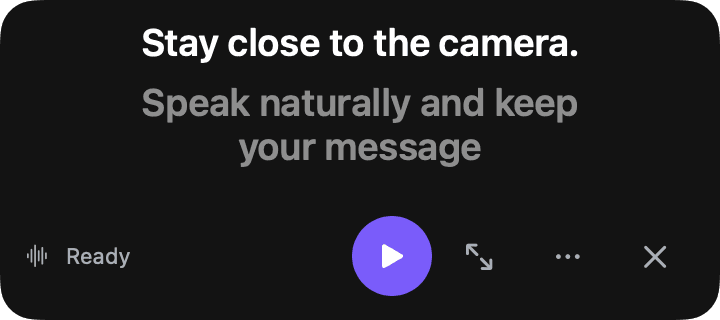
Cuey is a native Mac app that lives in the menu bar. It puts one line at a time at the notch, under the camera (the default), to the left or right of it, or in a floating window. Voice Follow listens through Apple speech recognition and advances when you reach the next line. If you pause or ad-lib, it waits. Read mode scrolls on a timer and Notes mode steps through bullet points by hand. Cuey doesn't store audio or transcripts. It has a Free version and a 2-day trial; Cuey Pro is $29 once, no subscription. More on the teleprompter for Mac page.
Textream: best free option
Textream is free under the MIT licence and needs macOS 15 or later. Its word-tracking mode uses macOS speech recognition to highlight each word as you say it, shown in a Dynamic Island-style overlay at the notch, a floating window or full screen on an external display (Textream on GitHub).
Notchie: notch prompter that hides from shares
Notchie costs $29.99 on the Mac App Store and needs macOS 14.6. It sits in the notch, scrolls when you speak and pauses when you pause, and its listing says the overlay is excluded from screen sharing in supported apps (Notchie, Mac App Store).
NotchPrompter: best low-cost notch app
NotchPrompter is $4.99 on the Mac App Store and open source. It sits in the notch, in a screen corner or floats, and uses your microphone to scroll while you talk. Its maker says it won't show up in screen recordings or screen sharing (NotchPrompter, Mac App Store).
Teleprompter.com: best across iPhone, iPad and Mac
Teleprompter.com runs on Mac, iPhone, iPad and more, with VoiceGlide voice scrolling on macOS (Teleprompter.com). On a Mac you can pop the script into its own window, keep it above all windows and make it see-through (Zoom guide). It's a free download with a Pro subscription; the App Store lists annual plans from $59.99 to $89.99 (App Store).
Teleprompter Pro+: best for studio rigs
If you searched for Teleprompter Premium or Teleprompter Pro, this is it: the Mac listing notes the app was renamed from Teleprompter Premium (Mac App Store). It offers text mirroring, remote control from keyboards and game controllers, and floating and transparent windows (user guide). Pro is $59.99 a year or $159.99 once (pricing).
Set up Cuey on your MacBook in 3 steps
 9:41
9:41Here's what we shipped this week.
- 1
Pick a placement
Open Cuey from the menu bar and choose Under Camera (the default) or Notch. - 2
Paste your script
Copy your script and press ⇧⌘V to quick-paste it from the clipboard. - 3
Start and speak
Choose Follow mode, allow microphone and speech recognition when macOS asks, then press ⇧⌘P. After the 3-second countdown, just talk.
One honest limit: Cuey doesn't hide itself from screen sharing. It's never in your camera feed, but if you share your entire screen, it can be seen. Share a single window or tab instead. For more on the notch placement, read our MacBook notch teleprompter guide; for how voice scrolling differs between apps, see voice-controlled teleprompters on Mac.